Customer data in ChatGPT, without ChatGPT seeing it
AI Shield replaces names, contact details, bank details and health information with placeholders such as [Person 1] while the text is still in your browser. The AI works with the placeholder; in the reply you read the real name again.
Coming soon to Microsoft Edge Add-ons
No account, no sign-in. Try it first: the demo page (German examples) shows what gets replaced.
Eleven kinds of information, each with its own placeholder
If the same person appears twice in a conversation, they get the same placeholder. The AI can still reply sensibly, for example “Dear Mr [Person 1]”, without ever knowing the name.
- Namesdetected from salutations, sign-offs, signatures and first-name lists
[Person 1] - Email addressesdetected including internationalised domains
[Email 1] - Phone numbersdetected German, Austrian, Swiss and international formats
[Phone 1] - IBANdetected check digit verified, all SEPA countries
[IBAN 1] - Tax IDdetected check digit verified
[Tax ID 1] - Social security numberdetected check digit verified
[Social Security No 1] - Postal addressesdetected street and number, postcode and town, PO box
[Address 1] - Dates of birthdetected only next to cues such as “born” or “date of birth”
[Date of Birth 1] - Customer numbersdetected after labels such as “customer no.” or “file reference”
[Customer No 1] - Contract numbersdetected after labels such as “contract no.” or “policy no.”
[Contract No 1] - Health informationdetected diagnoses, sick notes, disability, when they refer to a person
[Health Data 1]
You see what the AI receives. The placeholders appear in the input field, with a bar above it listing every replacement. Clicking an item puts the original value back.
You replace anything missed yourself. Select the text, right-click, “Replace selected text”. On sending, the extension checks again and pauses once if it still finds personal data.
Files become text. AI Shield reads Word files, PDFs with a text layer, CSV and text files in the browser and pastes the protected text instead of uploading the file.
Six services, each with our test bench verdict
Placeholders reduce what reaches the provider. Which plan is suitable for company data is still a question of the contract. In our GDPR test bench (in German) we assess every service against ten criteria, with evidence for each statement. The extension shows the same verdict in the browser.
-
ChatGPT
With conditionschatgpt.com
See the assessment of 19 October 2026 (ChatGPT) in German, including which plan is suitable -
Claude
With conditionsclaude.ai
See the assessment of 19 October 2026 (Claude) in German, including which plan is suitable -
Google Gemini
Suitablegemini.google.com
See the assessment of 28 October 2026 (Google Gemini) in German, including which plan is suitable -
Microsoft Copilot
Not recommendedcopilot.com
See the assessment of 28 October 2026 (Microsoft Copilot) in German, including which plan is suitable -
Microsoft 365 Copilot Chat
With conditionsm365.cloud.microsoft
See the assessment of 28 October 2026 (Microsoft 365 Copilot Chat) in German, including which plan is suitable -
DeepL
With conditionsdeepl.com
See the assessment of 19 October 2026 (DeepL) in German, including which plan is suitable
Other AI services, such as Le Chat or Perplexity, are not supported in the first version.
The real values stay in your browser
The path of a pasted text, step by step:
Your browser
- Paste. AI Shield intercepts the text from the clipboard before the AI site sees it.
- Detect. Rules, check digits and name lists look for personal data, without a language model and without an internet connection.
- Replace. The mapping “[Person 1] = real name” is kept in the browser’s session storage, separately for each tab and conversation.
- Send. Only the placeholders go into the input field and on to the AI.
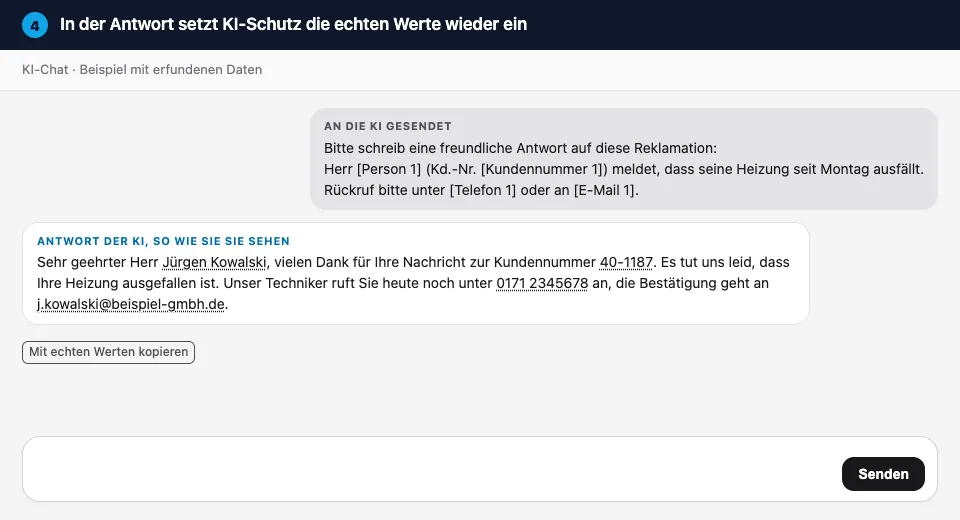
- Reply. The AI replies with placeholders.
- Display. AI Shield shows the real values in their place, shielded so that the AI site’s scripts cannot read them. The site itself continues to store only placeholders.
AI service
receives (4) and sends back (5)
“Dear Mr [Person 1], we will call you back on [Phone 1].” The provider does not receive the real name or number.
frag.hugo
receives no content
Once a day the extension downloads a signed list describing where the input field and the reply sit on the six sites. Your IP address is transmitted for technical reasons; we do not store it. No usage statistics, no per-device identifier. Error reports only if you switch them on in the options, and then without any text.
What AI Shield cannot do
Nobody checks an extension that promises everything. So here are the gaps we know about.
-
Typed text
Replacement happens on paste. Some sites read typed text while you type. The send check stops the sending, not the typing. So: paste rather than type.
-
Images, scans, voice
AI Shield cannot read photos, scanned PDFs or voice messages. You get a notice, nothing more.
-
Six services only
ChatGPT, Claude, Gemini, Microsoft Copilot, Microsoft 365 Copilot Chat and DeepL in the browser. No desktop apps, no other AI sites.
-
Chrome and Edge on desktop only
No Firefox, no Safari, no mobile browsers.
-
Rules, not mind-reading
Detection covers what follows a pattern, a check digit or a label. The name of a medicine or an unusual nickname may slip through. Take a look at the input field before you send.
-
Placeholders in old conversations
After the browser is closed, or after twelve hours without use, the mapping is deleted. Old conversations then show placeholders.
Company mode: roll out to every device without monitoring anyone
Company mode is part of the plans with an AI register: Hugo KI (in German), Hugo DSB Pro and Hugo DSB Premium. You set it up in the frag.hugo app on the “KI-Schutz” page.
Onto every computer in three steps
- Create a key. The app creates a deployment key for your organisation. It only unlocks company settings without any personal data and can be renewed at any time.
- Distribute the profile. Download the ready-made profile for Microsoft Intune, Windows Group Policy or macOS. It installs the extension in Chrome and Edge and stores the key.
- Share your AI policy. The extension shows a summary of your AI policy. Your staff confirm they have read it in the frag.hugo app, not in the extension.
Approval list
On each of the six services the extension shows a traffic light from your AI register: approved, approved with conditions, or not approved, with the reason and an alternative. If you wish, the browser policy generated by the app blocks AI sites that are not approved.
Monthly figures, only across everyone
Off by default. If you switch them on, you see, for example, “212 items replaced, 0 raw files uploaded” for the whole organisation, and only from five devices in a month upwards. No department, no person, no content.
Learning where AI is used
A one-minute learning unit each week in the extension’s window. Article 4 of the EU AI Act requires organisations using AI to take measures to support the AI literacy of their staff. The regulation does not require a particular level.
For the works council
Introducing an AI policy and technical equipment can be subject to co-determination under § 87(1) Nos. 1 and 6 of the German Works Constitution Act (BetrVG). AI Shield does not report any content or anything about individual people. In company mode you receive, if you switch it on, figures across all devices, and only from five devices upwards. The document for your works council is in the frag.hugo app on the “KI-Schutz” page; it lists every field the extension transmits.
Because the objective suitability for monitoring is already sufficient (Federal Labour Court, BAG, 16 July 2024, 1 ABR 16/23), there is no identifier that follows a device over months and no evaluation below five devices. We do not process employee data. For you as the employer, the legal basis for the roll-out is Art. 6(1)(f) GDPR; according to the BAG ruling of 8 May 2025, 8 AZR 209/21, § 26(1) of the German Federal Data Protection Act (BDSG) does not apply.
The plans that include company mode are listed on our pricing page (in German). More about the AI register and Article 4 training on the Hugo KI page (in German).
Try it with made-up data
The demo page has three sample texts: a complaint, a medical report letter and a payment reminder. Next to each one you see what the AI would receive. With the extension installed, copy a text and paste it into ChatGPT or DeepL. The examples are in German.
Questions about AI Shield
Yes. The extension is free for everyone and works without an account or sign-in. Company mode, with central roll-out, an approval list and your AI policy, is additionally included in the frag.hugo plans with an AI register: Hugo KI, Hugo DSB Pro and Hugo DSB Premium.
No. Detection and replacement happen in your browser. Which placeholder belongs to which real value is kept only in the browser’s session storage and is never sent to us. The only request to frag.hugo is a daily download of a list describing where the input field and the reply sit on the six supported sites. That list contains no personal data.
Not on its own. AI Shield considerably reduces the personal data that reaches the AI provider. Whether a service is suitable for your organisation still depends on the plan and the contract; our GDPR test bench (in German) shows which plan fits which service. The extension also does not replace the assessment of whether a particular use is permitted.
Names, email addresses, phone numbers, IBANs, German tax IDs, social security numbers, postal addresses, dates of birth, customer and contract numbers, and health information. IBANs, tax IDs and social security numbers are recognised by their check digit; customer numbers and dates of birth only when a label precedes them. Detection uses rules and name lists, not a language model.
Before you send, the input field shows exactly what the AI will receive. Select anything that was missed and replace it via the right-click menu (“Replace selected text”). On sending, the extension checks the text again and pauses once if it still finds personal data. Conversely, clicking an item in the notice bar restores the original value if too much was replaced.
Only partly. Replacement happens when you paste. Some AI sites read typed text while you are still typing, and an extension cannot prevent that. The send check stops the sending, not the typing. Our recommendation: paste customer texts rather than typing them out.
AI Shield reads text files, CSV, Markdown, Word documents and PDFs with a text layer in the browser, replaces the personal data and offers to paste the protected text instead of uploading the file. Images and scanned PDFs cannot be read; you will see a notice instead. The limit is 100,000 characters or 30 pages.
The mapping between placeholder and real value only applies to the current session. It is deleted when you close the browser, after twelve hours without use, or when you choose “Delete mapping” in the side panel. Opening an old conversation therefore shows the placeholders. That is intentional.
Introducing an AI policy and technical equipment can be subject to co-determination under § 87(1) Nos. 1 and 6 of the German Works Constitution Act (BetrVG). AI Shield does not report any content or anything about individual people. In company mode you receive, if you switch it on, figures across all devices, and only from five devices upwards. Customers find a document for the works council, listing every field that is transmitted, in the frag.hugo app on the “KI-Schutz” page.
Google Chrome and Microsoft Edge on desktop computers. Firefox, Safari, mobile browsers and the AI providers’ desktop apps are not supported.
Privacy notice
The extension is provided by frag.hugo Informationssicherheit GmbH. In free mode we do not process any personal data of users: texts, placeholders and mappings stay in the browser. When the site list is downloaded each day, the IP address is transmitted for technical reasons; we do not store it. In company mode the extension downloads your organisation’s configuration; this identifies the organisation, not the person. Monthly figures are counters without any personal reference and are only active if your organisation switches them on. Details are in our privacy policy, section “frag.hugo KI-Schutz” (in German).
Replace first, then ask.
AI Shield is free in the Chrome Web Store. The demo page shows beforehand what the extension replaces.
Coming soon to Microsoft Edge Add-ons
Open the demo page (German examples)